


Androidify
3.454.00 Reviews
App Specs
- Version
- 1.3.0
- Updated On
- License
- Free
- Downloads
- 50,000+
- Developer
- Google Samples
- Categories
- Libraries & Demo
- Platform
- Android
Screenshots
 Analysis by AppCompare
I like avatar makers most when they give me a clear starting point and let me reach a shareable result without turning the process into a project. Androidify is built around that small, enjoyable task: shaping an Android character until it feels like a playful stand-in for you, a friend, or an idea. It is a free creative app from Google Samples, in the libraries-and-demo area, and its appeal is less about practical utility than about making something personal with a few choices.
That focus also sets expectations. I would reach for it when I want a quick character to send to a friend or use as a lighthearted image, not when I need a full illustration suite, a photo-real portrait, or a social network for avatars. It is suitable for everyone, and its current version is 1.3.0. The average rating is 3.4 from around 415 ratings, with over 50,000 installs, so it has found an audience but is not an obvious universal favorite.
Starting with a simple idea
A useful way to approach the app is to begin with one recognizable detail rather than trying to make a perfect miniature portrait. Maybe your friend always wears a hat, you want to capture your own usual colors, or you are making a character for a group chat. That small prompt helps keep the choices purposeful. Without one, it is easy to browse accessories for their own sake and end up with a funny design that does not communicate what you intended.
The blank Android character is a convenient starting condition because it removes the pressure of drawing from scratch. I can think about the silhouette and personality instead of sketching anatomy. This is where the app works best for people who want to experiment but do not consider themselves artists: the basic figure does much of the structural work, and the custom choices supply the character.
Building a character, then getting it out of the app
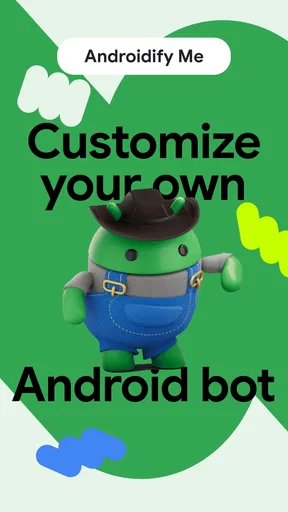
First things first, when you fire up Androidify, you're greeted with a blank canvas, or rather, a base Android character that's just waiting for your creative touch. The interface is super intuitive, so even if you're not the most tech-savvy person around, you'll find yourself navigating through the options with ease.
You can customize everything from the shape of the head to the size of the eyes. Want to rock a mohawk or a classy fedora? No problem! The app offers a wide range of hairstyles and accessories. And if you're a fan of vibrant colors, the palette is there to make your avatar pop with personality.
Make choices in passes instead of all at once
For a more controlled result, I would work from the biggest visual decisions to the small finishing touches: choose the overall head and face, settle on a hair or hat direction, then use clothing and accessories to reinforce the same idea. This order is more useful than treating every option as equally important. A distinctive silhouette reads quickly in a small avatar, while several competing accessories can make the design feel busy.
Worth Reading Before You Choose

EA SPORTS FC Mobile 26 Is a Bigger Football Game, but It Takes Time

Flipboard Shows What News Apps Must Do Beyond the Feed

Switching to Android Auto Means Rethinking Your Driving Routine

Google Calendar Makes a Crowded Week Easier to Manage

Ludo King Makes the Most of the Minutes Between Plans

Baby Panda World Brings Quick Play to Modern Phones, but Its Game Library Feels Busy
Color is worth treating as a coordination tool, not just a way to make every item bright. If the outfit already has a strong color, a quieter accessory can keep the character readable. Conversely, a mostly simple look can take one bold accent without losing its shape. That is a practical trade-off for anyone who plans to share the finished image at small size: a design that looks amusing when enlarged may become hard to recognize when reduced to a chat thumbnail.
Accessorizing to the Max
What really sets Androidify apart is the sheer variety of accessories. We're talking sunglasses, scarves, and even cowboy boots. The choices are practically endless, allowing you to create an avatar that’s uniquely you. The detail in the accessories is impressive, giving your creation a polished look.
Express yourself through your avatar’s wardrobe—whether it’s a formal suit or a laid-back hoodie. The selection caters to all styles, making sure your avatar looks as fashionable or as casual as you want it to be.
There is a useful distinction between an accessory that adds a joke and one that explains the character. Cowboy boots or a dramatic hat can make the design instantly comic; a scarf or familiar style of clothing may feel more like a personal signature. I would choose based on the recipient and the purpose. For a private joke with a friend, exaggeration is a strength. For an avatar you expect to reuse, a more restrained combination is less likely to feel dated or distracting.
From finished design to a message or gallery
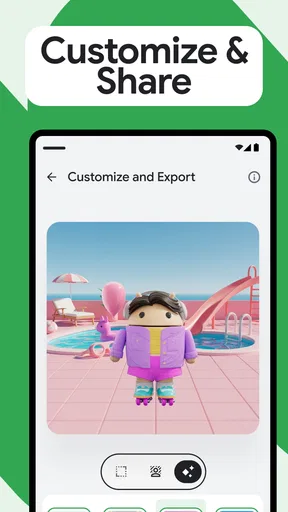
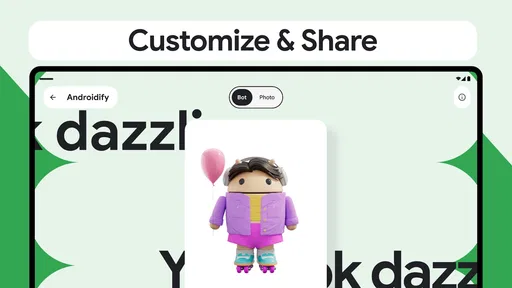
Once your avatar is ready, it’s time to show off your masterpiece. The app makes it easy to share your creation on social media platforms, so your friends can see your artistic side. Plus, you can save your avatars in your device’s gallery, providing a fun collection of your creative endeavors.
That handoff is what turns the editor into something more than a short distraction. In an everyday scenario, I might make a silly character while waiting for a friend, save it, then send it in a conversation when the joke comes up. Saving to the gallery also gives me a simple way to keep a version for later instead of relying on memory to recreate the same look. If I am preparing an image for a particular service, I would check the saved result there before treating it as a finished profile picture; sharing destinations can display images differently, and a playful full-body design may not fit every crop.
For a small group activity, the same flow can work as a low-pressure prompt: each person makes a character that represents a mood, an inside joke, or a weekend plan, then shares it in the group chat. The important advantage is that everyone can contribute without needing drawing skills. The limitation is that the app is an editor, not a shared avatar room, so the handoff happens through the usual gallery or social sharing route rather than through a collaborative space inside the app.
Where this style of avatar fits
Compared with a general illustration app, this is a more approachable choice when the goal is a character built from a familiar Android figure rather than a freehand image. A drawing tool gives an experienced user more control over composition and detail, but it also asks for more effort. Compared with photo-avatar tools, this app leans into a toy-like character instead of trying to preserve realistic facial likeness. That makes it a better fit for a light joke, a casual icon, or a themed character, and a weaker fit when you need a close portrait or precise personal resemblance.
It also occupies a different space from social avatar platforms. Those can be better if you want an ongoing identity tied to a community or a set of interactions. Here, the satisfaction is in making an individual design and carrying it elsewhere. I would choose it for a quick creative handoff, but I would choose a dedicated drawing or photo-editing tool for detailed artwork, fine image adjustments, or a carefully controlled brand asset.
The Fun Factor
Let’s be honest, Androidify is just plain fun. It’s perfect for killing time on a lazy afternoon or when you're in the mood to unleash your inner designer. The app doesn’t take itself too seriously, which is what makes it so entertaining. You can spend hours tinkering away, trying out different combinations and laughing at the results.
And if you’re someone who enjoys a good laugh, try out some of the more outlandish options. There’s something incredibly amusing about seeing an Android character dressed as a pirate or a rock star.
For parents and children, the appeal is easy to understand: it offers a simple creative activity with a visible outcome, and the age rating is Everyone. I would still keep the activity focused on making characters rather than assuming that a child wants or needs to post them publicly. For adults, it is especially suited to a brief break or a shared joke. If your idea of a good creative session involves layers, precise brushes, or building a scene around a character, this will feel intentionally limited rather than like a substitute for a full art app.
Where the workflow can snag
While Androidify is a blast, there’s always room for growth. It would be great to see more skin tone options and an even wider variety of clothing styles to choose from. Occasionally, the app can be a little slow when loading certain items, but these are minor hiccups in an otherwise delightful experience.
That loading pause matters more when I am trying to compare several options quickly than when I am casually exploring. A practical workaround is to settle the main look first and avoid repeatedly switching between unrelated categories; it keeps the creative process from becoming a test of patience. The limited range of representation and clothing can also become more noticeable when the goal is a specific person rather than a loose caricature. If the available choices do not capture the person you have in mind, adding more accessories will not necessarily solve that mismatch.
Another trade-off is that a design can be fun to build without being useful everywhere. The character’s playful style may not suit a formal work profile, and the app is not the right tool when you need a neutral headshot or a precise likeness. I would treat the gallery save as a creative result, then decide separately whether that image works for the place where I plan to use it.
Adding a multiplayer feature where users can interact with each other’s avatars could also bring an exciting new dimension to the app. Imagine having your avatars meet up in a virtual world!
Who should make room for it
I would recommend trying it if you enjoy turning small visual choices into a character, want a quick image for a private conversation, or like making playful variations on a basic figure. It is also a sensible pick for someone who wants an accessible creative activity rather than a blank drawing page. Since it is free, it is easy to test whether the style suits you without making the decision feel like a commitment.
I would skip it if your priority is a lifelike profile image, extensive control over illustration, a deep catalog of clothing that reliably represents a particular person, or built-in interaction with other creators. Those needs point toward a photo tool, a drawing app, or a social platform designed around shared avatars. The deciding question is simple: do you want a quick, stylized Android character you can save and pass along, or do you need a more flexible image-making system? This app is strongest in the first case.
Final Thoughts
All in all, Androidify is a charming app that lets you express your creativity while having a blast. Whether you’re designing for yourself or creating hilarious avatars for your friends, it’s an engaging way to pass the time. So if you’re looking to add a splash of fun to your day, give Androidify a whirl and let your imagination run wild!
My recommendation is to go in with one clear idea, make the silhouette and outfit support it, and save the result once it feels right. That small workflow avoids endless browsing and makes the finished character easier to share. The app is not trying to replace a serious art or portrait tool, and it is better for being honest about that role: a light, approachable avatar maker whose best moments come from a clever combination and the reaction it gets from someone else.
Pros
- Highly customizable avatars.
- Intuitive user interface.
- Regular updates with new features.
- Light on device resources.
- Creative and fun to use.
Cons
- Limited clothing options.
- Some features require internet.
- Occasional app crashes.
- Ads can be intrusive.
- No support for 3D avatars.
FAQs for Androidify
What is Androidify and what does it do?
Androidify is a fun and creative app that allows users to customize and create their own unique Android avatars. With a wide range of options for clothing, accessories, and features, users can express their personality through their avatars. The app makes it easy to share your creations on social media or use them as profile pictures.
Is Androidify free to use, and are there any in-app purchases?
Androidify is free to download and use. However, it may offer in-app purchases for additional customization options or premium features. Users can enjoy a wide array of free features but might need to spend on certain exclusive items to enhance their avatar further.
What features does Androidify offer for avatar customization?
Androidify provides a variety of features for avatar customization, including clothing, hairstyles, accessories, and body shapes. Users can choose from different colors and styles to create a unique look. The app is regularly updated with new items, ensuring fresh options for creativity and personalization.
Can I share my Androidify avatars on social media platforms?
Yes, Androidify makes it simple to share your avatars on various social media platforms. Once you’ve designed your avatar, the app offers options to export and share your creation directly to networks like Facebook, Twitter, and Instagram, or save them to your device for later use.
Is Androidify compatible with all Android devices?
Androidify is compatible with most Android devices running a recent version of the operating system. However, older devices or those with limited hardware capabilities might experience performance issues. It's always a good idea to check the app's compatibility with your specific device model before downloading.


